> ## Documentation Index
> Fetch the complete documentation index at: https://docs.ewake.ai/llms.txt
> Use this file to discover all available pages before exploring further.
# Rootly
> Connect Rootly to give ewake read access to your incidents so it can pull live incident context into investigations.
**What you'll get:** ewake can read your Rootly incidents and match the one tied to the Slack channel it's working in, surfacing severity, status, and summary directly in the investigation, without anyone pasting context by hand.
***
## Prerequisites
* A Rootly account with permission to create API keys
* An API key with **read access to incidents**
* Access to your ewake dashboard
***
## Configuration
In Rootly, go to **Configuration** → **API Keys** → click **Generate New API Key**.
Give it **observer** (read-only) permissions, ewake only needs read access to incidents.
Copy the key now, you won't be able to see it again after closing the screen.
In your ewake dashboard, go to **Integrations** → **Rootly** → click **Configure**.
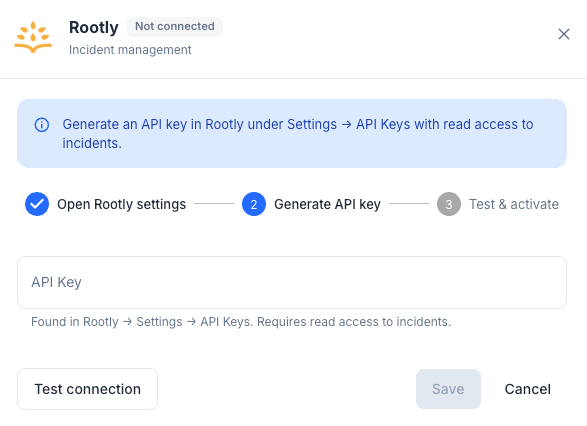 | Field | Value |
| ----------- | --------------------------- |
| **API Key** | The key generated in Step 1 |
Click **Test Configuration** to verify the connection, then click **Save**.
Rootly is connected. Ewake can now pull incident context during investigations.
***
Ewake only requires **read-only** access to Rootly. It never declares, edits, or resolves incidents.
| Field | Value |
| ----------- | --------------------------- |
| **API Key** | The key generated in Step 1 |
Click **Test Configuration** to verify the connection, then click **Save**.
Rootly is connected. Ewake can now pull incident context during investigations.
***
Ewake only requires **read-only** access to Rootly. It never declares, edits, or resolves incidents.