

What you’ll get: ewake can search and read the Notion pages you share with it during an investigation, surfacing runbooks, architecture notes, and incident retrospectives from your team’s workspace, without anyone pasting context by hand. The same one-click connection also offers AI search, which searches the full content of your pages by meaning — not just their titles.
Prerequisites
- A Notion workspace, with permission to authorize an integration
- The pages and databases you want ewake to reach, ready to share during authorization
- For AI search: a Notion workspace with Notion AI available
Configuration
Connecting Notion is a one-click OAuth authorization — ewake never asks you to copy or paste a token. It’s a single procedure with two Notion consent screens back to back: the first grants read access to your pages, the second turns on AI search.1
Click Connect Notion
In your ewake dashboard, go to Integrations → Notion → click Connect Notion.
2
Authorize page access
You’ll be redirected to Notion. Select the workspace to connect, then choose the pages ewake may access, and click Allow access. This first authorization is the connection ewake reads your pages through.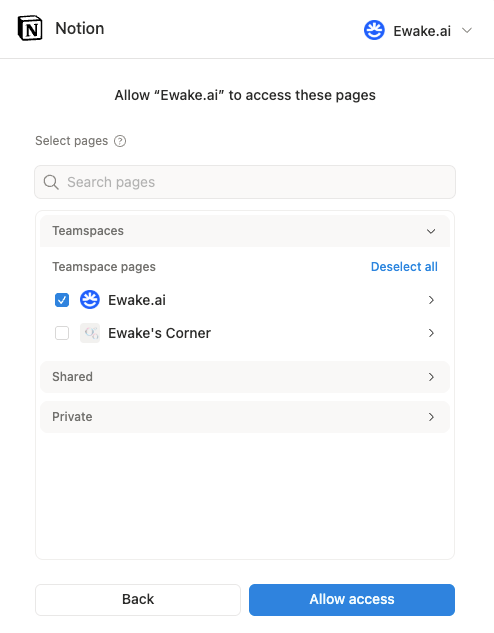
A Notion integration can only see the pages and databases it has been given access to. Grant your top-level runbook pages, engineering wikis, and incident retrospective databases for the broadest coverage.
3
Turn on AI search (recommended)
Right after the first screen, Notion shows a second consent — for its hosted MCP server, which powers AI search. Approve it to let ewake search the full content of your pages by meaning, not just their titles.You can decline this second screen — page access is already saved, so you land on a connected dashboard with no error. Turn AI search on later whenever you like (next step).
Notion is connected. Ewake can now search and read your pages during investigations — semantically, once AI search is on.
4
Manage AI search or share more pages (optional)
From Integrations → Notion → Overview you can connect AI search if you declined it, reconnect it if it needs attention, or disconnect it while keeping page access.To let ewake reach a page you didn’t grant during authorization, open the page in Notion → click ••• (top right) → Connections → select ewake. Any page shared this way is searchable on the next investigation, no reconnection needed.
What ewake can do
Once connected, ewake reads from Notion on demand during an investigation:- Search across the pages and databases shared with it, to find the relevant runbook or note.
- Read a page, returning its title, link, and body as plain text so the agent can quote the runbook step or retro that explains what’s happening.
- Searches page content semantically — matching on meaning across the full body of your pages and connected sources, not just their titles.
Ewake uses read-only access to Notion. It never creates, edits, or deletes pages.